




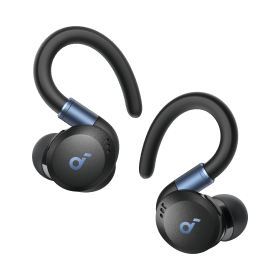


How to Use Translator Earbuds: A Comprehensive Guide
Traveling abroad, joining international meetings, or simply having everyday conversations with people who speak a different language can quickly become frustrating if communication breaks down. Language barriers don’t just slow things down—they can create misunderstandings and missed opportunities.
At soundcore, we focus on making communication feel natural, even across languages. With the rise of AI-powered translation earbuds, real-time translation is no longer limited to bulky devices or phone screens. In this guide, you’ll learn how translator earbuds work, how to use them effectively, and how newer AI-assisted models—such as the soundcore AeroFit 2 AI Assistant—are changing the way people communicate across languages.
Whether you’re travelling, working, or simply curious about multilingual conversations, this guide will help you get started with confidence.
How Do Language Translator Earbuds Work?
Language translator earbuds combine hardware and AI software to deliver near real-time translations directly to your ears. While the experience feels simple, several processes happen almost instantly behind the scenes:
Audio Capture
High-quality microphones pick up spoken words clearly, even in busy environments. Open-ear designs, like the one used in AeroFit 2, allow you to stay aware of your surroundings while still capturing speech accurately.
AI Translation Processing
The captured speech is sent to an AI-powered translation engine. Using machine learning and natural language processing, the system identifies context, tone, and sentence structure before translating into the selected language. This AI layer helps improve accuracy beyond basic word-for-word translation.
Audio Output
Once translated, the speech is played back through the earbuds in near real time, allowing conversations to flow naturally without constant pauses.
Because this entire process happens in seconds, users can focus on the conversation itself rather than on the technology.

How to Use Translator Earbuds Step by Step
Despite the advanced technology inside, using translation earbuds is surprisingly straightforward. Here’s how to get started.
Check Compatibility
Most translation earbuds work alongside a smartphone app via Bluetooth. Before starting, make sure:
- Your phone’s operating system is up to date
- The earbuds are compatible with the official app
Initial Setup
- Fully charge your earbuds
- Download the soundcore app from your app store
- Enable Bluetooth on your device
- Pair the earbuds by following the in-app instructions
The app will guide you through permissions and initial settings, including access to the AI assistant features.
Select Language Preferences
Choose your spoken language and the target language you want translated. Many users set multiple language pairs, which is helpful if you travel frequently or attend multilingual meetings.
AI-based models can also adapt better to accents and conversational speech over time.
Wear the Earbuds Comfortably
Proper fit matters—not just for comfort, but for microphone accuracy. Adjust the earbuds until they sit securely without blocking your ears completely. A stable fit helps reduce background noise and improves voice pickup, especially in open spaces.
Start the Conversation
Once connected, you can begin speaking naturally. The earbuds automatically capture speech, process the translation, and play it back with minimal delay. There’s no need to press buttons or pause after every sentence, making conversations feel far more natural.
Maintain a Stable Internet Connection
While some earbuds support limited offline translation, real-time AI translation works best with a stable internet connection. This allows access to cloud-based language models, resulting in more accurate and context-aware translations.
Benefits of Using Translator Earbuds
Translation earbuds are more than just a convenience—they can significantly improve daily communication in multiple scenarios.
Smoother Travel Experiences
Many travellers report that language barriers are one of the most stressful parts of visiting a foreign country. Translation earbuds help with everyday interactions such as ordering food, checking into hotels, or asking for directions, making travel feel more relaxed and immersive.
A Real Advantage in Professional Settings
Global collaboration is now the norm. Translator earbuds can help reduce misunderstandings during meetings, negotiations, or site visits, especially when participants aren’t fluent in the same language. This can lead to clearer communication, faster decisions, and more productive teamwork.
Deeper Cultural Connection
Unlike phrasebooks or basic translation apps, real-time translation allows you to follow the flow of a conversation. You can better understand humour, tone, and cultural nuances, which often get lost in text-based translations. This leads to more meaningful personal and professional connections.
Time and Cost Efficiency
Hiring interpreters or relying on manual translation tools can be expensive and time-consuming. Translation earbuds offer a more practical solution for everyday communication, especially for frequent travellers or international professionals.
Introducing the Latest AI Translation Earbuds: Soundcore AeroFit 2 AI Assistant
If you’re exploring the most advanced way to communicate across languages with earbuds, the soundcore AeroFit 2 AI Assistant stands out as a powerful example of what modern translation earbuds can do. This model combines seamless real-time translation with a voice-activated AI assistant, all packed into comfortable, open-ear wireless earbuds.
Real-Time Translation for Global Conversation
These earbuds support AI-powered real-time translation across 100+ languages, helping you understand and participate in foreign languages, whether you’re traveling, attending international events, or chatting with new friends. Using voice commands like “Hey Anka”, you can launch live translation without touching your phone.
Hands-Free AI Assistant Integration
By saying “Hey Anka”, you can activate the built-in AI assistant for hands-free help—everything from instant answers and searches to earbud control. This intelligent voice feature makes AeroFit 2 more than just translation earbuds; it’s a true AI companion you can use on the go.
Comfortable Fit & Quality Audio
Designed with soft materials and adjustable ear hooks, the AeroFit 2 offers a pressure-free fit suited for all-day wear and stability during movement. The earbuds also deliver rich audio performance—powered by large racetrack drivers, BassTurbo acoustics, Bluetooth 5.4, and LDAC support—for deep bass and clear sound when you’re listening to music or media.
Long Battery Life & Convenient Charging
Enjoy up to 8.5 hours of continuous playback on a single charge, extendable to up to 35 hours with the charging case. The earbuds also support wireless charging, making it easy to top up power without tangled cables.

Conclusion
Language should never be a barrier to connection. Translator earbuds make it easier than ever to communicate across cultures, whether you’re travelling, studying abroad, or working with international partners.
With AI-powered models like the soundcore AeroFit 2 AI Assistant, translation feels faster, more natural, and more integrated into everyday life. As translation technology continues to evolve, real-time multilingual communication is becoming less of a challenge—and more of a standard.
FAQs
How do translator earbuds work?
Translator earbuds use microphones to capture speech, AI-powered software to translate it, and built-in speakers to play back the translated audio in real time.
How do I activate translation on my earbuds?
Pair your earbuds with the companion app, select your language settings, and begin speaking. The translation process starts automatically.
Do translation earbuds require WiFi?
Not always. Some earbuds support limited offline translations, but real-time AI translation typically requires an internet connection for the best accuracy and performance.H
No, you don't always need WiFi to use translation earbuds. Many models can function with offline translation modes once the necessary languages are downloaded. However, for real-time translations and AI-powered features, a stable internet connection may be required to access the full range of services and updates.


